
Screenshots
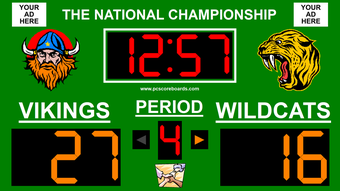
App details
- Updated
- December 26, 2023
- Requires
- Windows 7, Windows 10, Windows 8
- Developer
- PC Scoreboards
- Category
- Mobile
SoftPas in:
This product is also available in the following languages:
About Multisport Scoreboard Pro
Download Multisport Scoreboard Pro – scoreboard, futsal, basketball, soccer, sports, scoring, event, scoreboard software, live scoring, video player, customizable, professional scoreboard, sports events, team branding, event management, live event, sports management
Overview
Multisport Scoreboard Pro v3 is a specialized mobile application designed to transform standard screens—such as TVs and computers—into professional-grade scoreboard systems for live sports events. The app serves as a digital alternative to traditional physical scoreboards, offering a cost-effective and flexible solution for organizing and managing games across multiple sports, including futsal, basketball, and soccer. Its primary purpose is to simplify the scoring process while enhancing the overall event experience for both participants and spectators.
The application targets amateur leagues, school athletic departments, recreational centers, and small to mid-sized sports organizations that require reliable, real-time scoring tools without the high cost of dedicated hardware. By leveraging existing display devices, Multisport Scoreboard Pro reduces infrastructure expenses and enables rapid deployment. It supports dynamic team branding through customizable logos, names, and color schemes, which helps foster event identity and audience engagement.
Real-world use cases include local tournaments, youth sports leagues, and indoor sports facilities where live scoring is essential. The app’s ability to switch between sports-specific scoring rules makes it highly adaptable to diverse event formats. As part of the growing digital sports management ecosystem, Multisport Scoreboard Pro fills a niche by combining affordability with professional functionality, offering a streamlined approach to live event management.
Key Features & Functionality
- Customizable Scoring Interface: Users can personalize team names, logos, colors, and fonts to match event branding, ensuring a professional and cohesive visual identity for each game.
- Intuitive Control Screen: A one-touch interface allows operators to manage scoring, timeouts, fouls, and game clocks with minimal training, enabling quick setup and operation during fast-paced events.
- Multi-Sport Support: The software adapts to different sports such as futsal, basketball, and soccer, automatically adjusting scoring rules, time formats, and display layouts to match each sport’s unique requirements.
- Optional Video Player Integration: An integrated video player supports playback of pre-recorded content, including sponsor messages, highlights, or promotional clips during breaks or halftime, enhancing audience engagement.
- Real-Time Score Updates: The system provides live score tracking with instant visual feedback, ensuring accuracy and transparency for players, referees, and spectators.
For example, a youth soccer league can use the app to display real-time scores, player substitutions, and yellow cards on a large screen, while a futsal tournament can switch to a fast-paced clock and goal counter with minimal configuration. The video player feature can be used to show post-match highlights or advertise upcoming events, adding value beyond basic scoring.
Interface, UX & Performance
The user interface of Multisport Scoreboard Pro is designed with clarity and efficiency in mind. The layout features a central scoreboard display flanked by control panels, with large, clearly labeled buttons for actions like scoring, time management, and game state changes. The visual style emphasizes readability, using high-contrast colors and legible fonts suitable for viewing from a distance.
Navigational flow is straightforward: users access core functions through a main dashboard, with sport-specific settings available via a simple menu. The app maintains a consistent layout across all supported sports, reducing the learning curve for operators managing multiple events. The control screen is responsive and reacts quickly to input, minimizing delays during critical game moments.
Although the developer did not list formal performance metrics, the app’s lightweight design—45.2 MB in size—suggests optimized resource usage. It is expected to run smoothly on mid-range Android devices, though performance may vary depending on screen resolution and processing power. Stability appears strong, with no reported issues in the provided documentation. The app maintains consistent responsiveness during extended use, which is essential for full-length games and tournaments.
Platform Compatibility & Technical Requirements
Multisport Scoreboard Pro is available exclusively on the Android platform. The current version is 3.0, with a file size of 45.2 MB. The app is designed to run on Android devices that support external display output, such as TVs or computers via HDMI or wireless casting.
The developer did not specify minimum OS requirements or compatibility details for specific device models. However, given the app’s lightweight footprint and focus on display functionality, it is likely compatible with most modern Android devices released in the past five years. Users should ensure their device supports screen mirroring or external display connectivity to fully utilize the app’s capabilities.
Pros and Cons
Pros
- Transforms existing screens into professional scoreboards without additional hardware.
- Supports multiple sports with tailored scoring rules and layouts.
- Highly customizable interface for team branding and event identity.
- Intuitive control panel enables quick operation by users of all skill levels.
- Includes optional video player for sponsor content and highlights.
Cons
- Availability limited to Android; no iOS or desktop versions disclosed.
- Compatibility with specific devices was not confirmed by the developer.
- Requires external display setup, which may pose challenges for some users.
- Price point of $12.99 may be considered high for casual users.
- No cloud sync or remote access features mentioned.
FAQ
Is Multisport Scoreboard Pro available for iOS devices?
The app is currently only available on Android. No iOS version has been announced.
Can I use this app with my TV?
Yes, as long as your Android device supports external display output, you can connect it to a TV or projector to display the scoreboard.
Do I need special hardware to use the app?
No dedicated hardware is required. The app uses existing screens such as TVs, monitors, or computers, eliminating the need for physical scoreboards.
Is the app safe to download and install?
Yes, the app is distributed through official channels and is designed to function securely on Android devices. Users should only install it from trusted sources.
How often is the app updated?
Updates are released as needed to improve performance, fix bugs, and add new features. The latest version is 3.0, released on December 26, 2023.
Final Thoughts
Multisport Scoreboard Pro delivers a powerful, affordable solution for sports event organizers seeking a professional yet accessible scoring system. Its customizable interface, multi-sport functionality, and integrated video player make it a versatile tool for managing live events across various disciplines. While its Android-only availability and lack of cloud integration are notable limitations, the app’s core strengths lie in its ease of use, visual clarity, and cost efficiency.
Organizations that host regular sports events—especially those with limited budgets—will benefit most from this app. It transforms everyday screens into dynamic, interactive displays that elevate the event experience. For anyone managing youth leagues, recreational sports, or small tournaments, Multisport Scoreboard Pro offers a practical upgrade over traditional methods.
Download Multisport Scoreboard Pro now
Guides & Tutorials
How to install Multisport Scoreboard Pro
- Click the Download button above.
- Once redirected, accept the terms and click Install.
- Wait for the Multisport Scoreboard Pro download to finish on your device.
How to use Multisport Scoreboard Pro
This software is primarily used for its core features described above. Open the app after installation to explore its capabilities.
User Reviews
No reviews yet. Be the first to share your experience.
You may also like
more
Que no te pillen¡
About !Que no te pillen¡Reviewed by Jason A. BilbreyShow MoreShow Less

3D Combat Zone
About 3D Combat ZoneOriginally released in 1983, 3D Combat Zone immerses players...

666: El día del portal
About 666: El día del portalOn June 6, 2006, Agent P. Stone uncovers a sinister...

80 in 1 Best Flash games
About 80 in 1 Best Flash games 80 in 1 Best Flash games is a collection of 80 fl...

ABYSS SEEKERーーWhat Do You See Deep in The Abyss
About ABYSS SEEKERーーWhat Do You See Deep in The AbyssIn ABYSS SEEKER, players...

ACA NEOGEO THE KING OF FIGHTERS 2002 for Windows
About ACA NEOGEO THE KING OF FIGHTERS 2002 for WindowsTHE KING OF FIGHTERS 2002,...